
Make the research your own
Build a watchlist for the counties and candidates you are following. Keep the source details and diligence connected to your next decision.
Explore your tax-lien workspaceTax Sale Atlas comparison
Updated · Accrella editorial team
Tax Sale Atlas is a public guide to county tax-sale information. Accrella is a workspace for researching candidates, reviewing bids and keeping certificate records. Use Atlas to find a source or learn the process, and choose Accrella when you are ready to organize your own investment work.
Turn a county source into a researched candidate, a reviewed bid and a certificate record you can keep working with.
Accrella supports nationwide tax-lien research, with data refreshed every day.
comparison table
A public guide and a private workspace can both be useful. Choose according to the next task you need to complete.
| Capability | Accrella | Tax Sale Atlas |
|---|---|---|
| Finding a starting point | Nationwide tax-lien research with daily refreshes and watchlists. | Public county guides, sale calendars and source links. |
| Learning the process | Workflow guidance alongside research and certificate records. | Educational guides and planning calculators. |
| Preparing your bids | Candidate diligence, strategy approval and county bid-sheet preview/export. | Reference information for your own sale preparation. |
| Keeping your portfolio | Owned-lien imports, certificate records, reporting and retained evidence. | The reviewed offering is a public information guide. |
| Getting access | Subscription plans for your managed-lien count and users. | Free public guides with sponsored/affiliate links. |
Atlas descriptions summarize its official pages. A source guide can complement Accrella; this does not imply an integration or automatic transfer.
Build a watchlist for the counties and candidates you are following. Keep the source details and diligence connected to your next decision.
Explore your tax-lien workspaceReview required diligence and approve a strategy before creating the county working CSV. Move from learning about a sale to organizing your own preparation.
See bid preparationImport owned liens, maintain portfolio records and retain acquisition evidence for future reporting and review.
Explore portfolio evidence01
Accrella gives your own candidates and certificates a working record, with the research and bid decision kept in context.
Follow the official county or auction-host source, check the sale date and retain the identifiers and rules that apply to your selected candidate.
Research candidates in Accrella and save the ones you want to review. Work through diligence and open questions before drafting the strategy.
Resolve required diligence, review and approve the strategy, then preview the county CSV. Complete registration, funding and bid submission through the auction host.
02
Start the workspace when you have a shortlist to review or purchased certificates to manage.
Retain the issuing county, original record and review date with your research so you can return to the source later.
Use the owned-lien import preview for your portfolio file. Check identifiers, amounts and missing fields against the original before saving the working records.
Keep acquisition evidence and notes available with the position. Use the portfolio records as a starting point for future reporting and review.
03
A county guide can answer a reference question. An Accrella account gives the candidates and certificates you work on a place to stay organized.
Standard supports 200 managed liens and Pro supports 1,000, each with one user seat. Enterprise supports custom seats and limits.
Compare Accrella plansContinue consulting official sources and guides as you work. Accrella’s county resource pages also link research starting points you can use for sale preparation.
Explore county research guidesInside Accrella
See how a certificate record brings source details, review requirements and retained notes into view. Keep the context available when you return to the next decision.
Explore the certificate record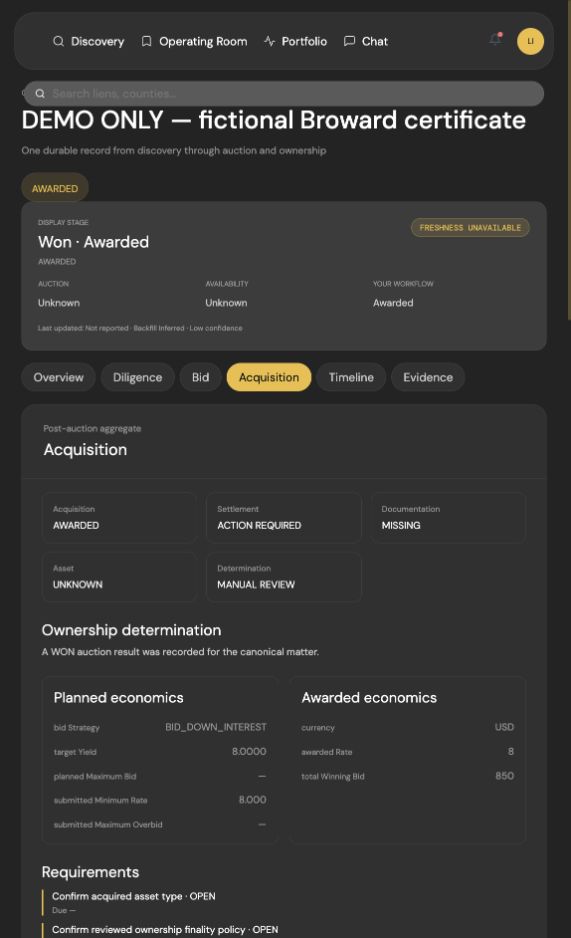
FAQ
Practical answers to help you choose your next step.
No. Tax Sale Atlas provides public guides and planning tools. Accrella provides tax-lien research and a workspace for your watchlists, diligence, bid strategies and certificate portfolio.
Yes. Use a guide to locate official county sources, then organize your candidates and certificate work in Accrella. This is a workflow choice, not a claimed technical integration or automatic transfer.
Accrella gives your research a working process: watchlists, AI-assisted diligence, reviewed bid sheets, owned-lien imports and portfolio records. The subscription is for organizing and completing that ongoing work.
Compare Accrella plansAccrella supports reviewed bid preparation and county CSV export. You remain responsible for the investment decision and for registration, funding and submission through the relevant auction host.
Sources and further reading
Official Tax Sale Atlas guide and editorial pages reviewed September 15, 2026. Accrella authored this comparison using published descriptions, not independent hands-on testing.
Your next move
Bring research, diligence and certificate records into one workspace. Start with your next candidate or the certificates you already own.
Product comparison only. Verify official records and current subscription terms. Not investment, legal or tax advice.
First published .